Introduction If your task is to filter Calvin Klein fall/winter tops while preserving size, color, images, and product page evidence, the safest approach isn't to treat the website catalog and Google Sheets as interchangeable tools, but to let them handle different stages: first discover and confirm products in fashion-reps' website-style catalog, then organize fields that need long-term comparison into Google Sheets. This way, you can keep the original page intact and repeatedly filter by size,
Introduction
If your task is to filter Calvin Klein fall/winter tops while preserving size, color, images, and product page evidence, the safest approach isn't to treat the website catalog and Google Sheets as interchangeable tools, but to let them handle different stages: first discover and confirm products in fashion-reps' website-style catalog, then organize fields that need long-term comparison into Google Sheets. This way, you can keep the original page intact and repeatedly filter by size, color, and link status. 📋
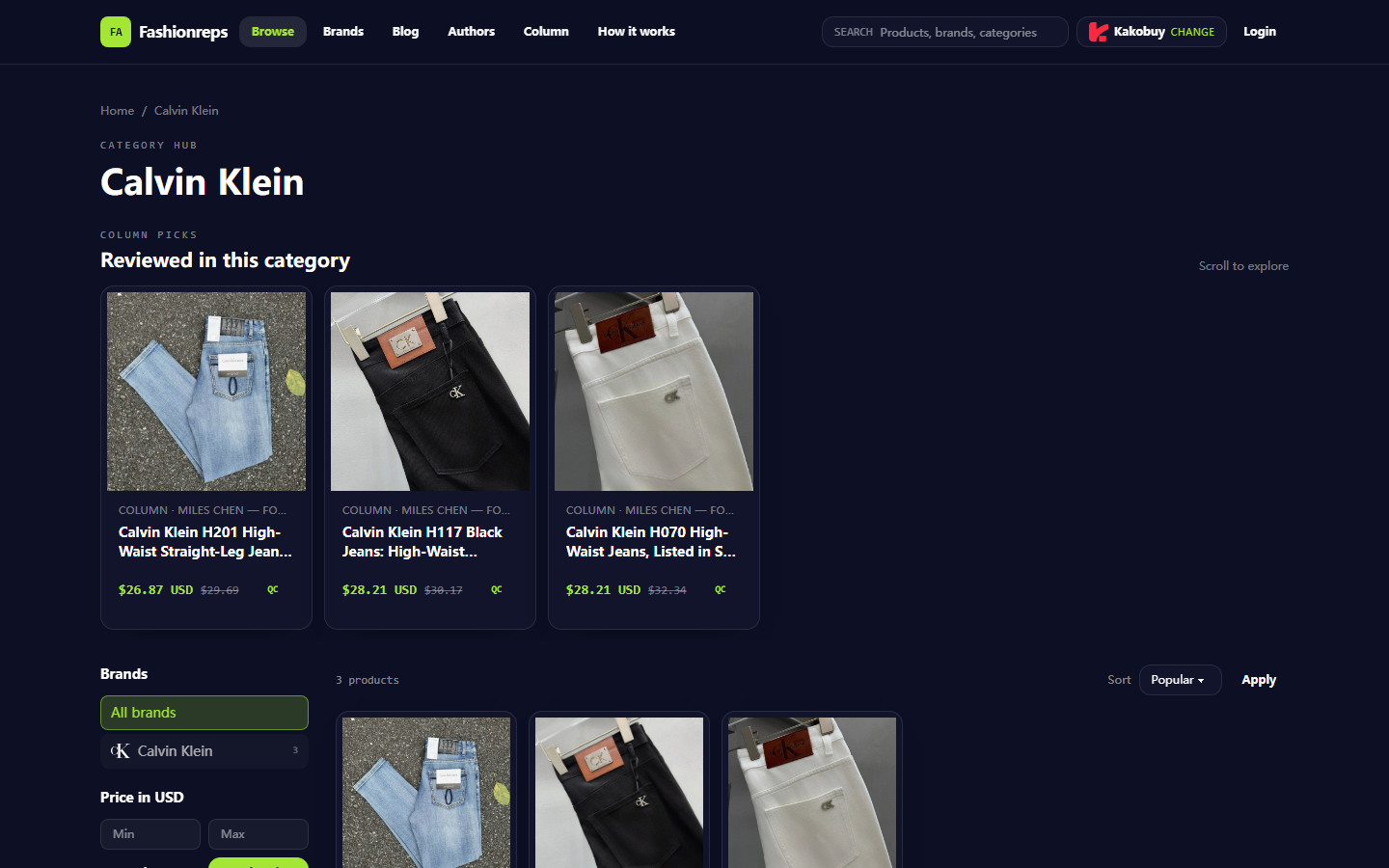
First, clarify the evidence scope: the currently verifiable Calvin Klein page is fashion-reps' Calvin Klein category page, whose title and product content show a pants category and list 3 Calvin Klein items. It proves that the site has visible features like brand filtering, price filtering, sorting, product cards, and QC entry, but it cannot directly prove that the page already offers fall/winter tops or a complete top size chart. Therefore, the method below uses page navigation as a discovery tool and leaves specific top size information to be verified item by item on product detail pages.
Define the Filtering Task for Calvin Klein Fall/Winter Tops and the Page Evidence Scope
Before starting to organize, first limit the task to an actionable step: find candidate products that meet the conditions of Calvin Klein, fall/winter tops, target size, and target color, and save reviewable page evidence for each candidate.
It's recommended to write down the following judgment criteria:
- Brand: Calvin Klein.
- Category: Knitwear, sweatshirts, jackets, coats, or other items clearly classified as tops.
- Seasonal clues: Fall/winter information explicitly present in page title, material, thickness, long-sleeve design, or seller description.
- Size: The sizes actually listed on the page, not replaced by the brand's common size range.
- Color: Preserve the original color text from the page and create a separate unified color label for filtering.
- Evidence: Product title, detail page URL, size chart screenshot or page save record, image, and verification date.
Also record inapplicable situations in advance. If a product only has a vague category label, no visible size information, a link that cannot be opened, or only images without confirmation of color and style, it should not be directly marked as a qualified candidate. 🔎

Figure: Currently visible is the Calvin Klein pants category, showing brand filtering, price range, sorting, product names, reference prices, and QC entry. This image is used to illustrate catalog navigation evidence, not as evidence for fall/winter top sizes.
Start from the fashion-reps Website-Style Spreadsheet to Find by Brand and Category
fashion-reps' category page is suitable for the first round of discovery. The current page shows a Calvin Klein brand filter, USD price range, sorting options, and product cards. The page also provides product names, reference prices, and QC-related entries, which can help you build an initial candidate list.
Recommended order of operations:
- Enter the brand or category entry, first confirm that the page displays the brand as Calvin Klein.
- Check the category name, exclude pants, shoes, or accessories and other pages unrelated to the top task.
- Use the visible filtering and sorting functions on the site to narrow the scope, but don't treat filtered results as final size judgments.
- Open each candidate product detail page to confirm that the title, top type, color, size, and images are all visible.
- Save the product page URL and verification date to the sheet, avoiding recording only the position in site search results.
- Mark pages that cannot be opened, redirect, lack product names, or have insufficient visible information as "to verify" rather than qualified products.
The current category page shows 3 Calvin Klein products, with example product names including H201 High-Rise Straight-Leg Jeans, H117 Black High-Rise Straight-Leg Jeans, and H070 High-Rise Jeans. These contents can be used to confirm the page structure, but should not be rewritten as fall/winter top candidates. The page also shows reference prices, such as $26.87, $28.21, etc.; because prices, inventory, and page status change, always record the verification date and currency when noting them. 💰
Design Size, Color, Image, and Link Columns in Google Sheets
The value of Google Sheets is to turn scattered information from different product pages into sortable, filterable, and collaborative records. The sheet should not replace the original page, but serve as an index and a review checklist.
It's recommended to use one row per product and at least set up the following columns:
| Field | Recording Method | Purpose |
|---|---|---|
| Product Title | Preserve original page text | Prevent confusion of styles during later organization |
| Brand | Uniformly record as Calvin Klein | Filter brand |
| Category | Record specific type such as knitwear, sweatshirt, jacket | Exclude irrelevant products |
| Page Size | Record the actual size displayed on the page, e.g., S, M, L, or other shown values | Preserve original evidence |
| Size Chart Data | Record chest, length, shoulder width and other page measurements | Support size comparison |
| Page Color | Preserve seller or page original text | Prevent color translation errors |
| Unified Color Label | Use labels like black, gray, navy for easy filtering | Enable horizontal comparison |
| Product Image | Save image URL or screenshot location | Review style and color |
| Product Link | Save detail page URL | Return to original evidence |
| QC or Page Evidence | Record visible QC entry, screenshot, or notes | Support later review |
| Verification Date | Use a specific date | Identify timeliness of information |
| Status | To verify, Candidate, Excluded, Reviewed | Control filtering progress |
It's best to split the size column into two parts: one column records the original size from the page, and one column records comparable measurement data. Do not write judgments like "runs large," "true to size," or "recommend sizing up" directly into the original size column, because such content needs corresponding measurement evidence or a clear source.
Color is also recommended to be split. The color displayed on the page should be preserved as is; for example, if the page says navy, washed black, or cream, do not overwrite it with Chinese. After setting a unified color label, it becomes convenient to filter by black, blue, or beige in the sheet. 🧵
How to Compare Page Fields and Sheet Records Item by Item for the Same Product
After completing the first round of entry, perform a page-to-sheet item-by-item review for each candidate product. The focus is not whether the sheet is filled, but whether each field can still be traced back to page evidence.
Check in this order:
- Does the product title match the detail page title, and was the category page title mistakenly used as the product title?
- Is the category indeed a top, and was it misjudged due to search terms or image appearance?
- Does the size come from the current page, not from a brand general size chart or another product?
- Are measurement data units preserved, and are chest, length, and shoulder width not misplaced?
- Does the color come from a text field or clear product options, not just speculated from images?
- Does the image correspond to the current product, and are images from the same style in different colors or other pages mixed in?
- Can the link be reopened, and does it redirect to a category page, login page, or dead page?
- Is the reference price indicated in USD with verification date, and does it match the current page display?
- Is the QC entry only an entry on the page, not written as having completed actual quality inspection?
If the sheet record is inconsistent with the page, prioritize keeping the original page record and change the sheet status to "to review." Do not guess missing sizes or fill in unshown colors just to make filtering results look neat.
Operational Trade-offs for Mobile Browsing and Desktop Organization
Mobile is more suitable for quickly opening product pages, viewing main images, confirming page accessibility, and excluding products that clearly don't meet conditions. It's good for short-term candidate discovery, but not suitable for comparing size charts, images, and link status of multiple products simultaneously.
Desktop is better for using Google Sheets' filtering, freezing header rows, conditional formatting, and multi-window comparison. When organizing, you can freeze the product title and status columns, then horizontally view size, color, image, and page link. For collaboration, it's recommended to have one organizer responsible for original fields, and another reviewer who only modifies status and notes, to avoid overwriting the same row simultaneously.
A practical division of labor:
- Mobile: Open page, confirm product type, save necessary screenshots or image locations.
- Desktop: Enter fields, unify color labels, compare measurement data, check duplicate products.
- Review phase: Reopen links, confirm page still accessible, and update verification date.
Whether using mobile or desktop, do not publicly share screenshots containing order numbers, addresses, phone numbers, payment information, or complete shipping labels. Product page evidence should only retain content necessary for filtering. 🔐
How to Record Page Updates, Link Changes, and Missing Sizes
Product pages may change prices, go out of stock, change images, modify sizes, or redirect links. Google Sheets should keep an update trail instead of directly overwriting old records.
It's recommended to use a status field to manage changes:
- Candidate: Page still accessible, and basic fields found.
- To review: Page accessible, but size, color, or image evidence incomplete.
- Reviewed: Title, category, size, color, and link have all been checked item by item.
- Page changed: Product still exists, but price, image, inventory, or size changed.
- Link broken: Page inaccessible or redirects to irrelevant page.
- Excluded: Not a fall/winter top, or does not meet task conditions.
Missing sizes cannot be equated with out of stock. A more accurate wording is "current page does not show this size" or "size availability not yet verified." If the page only lists S–XXL, also record that this is the displayed range, not an inference that all sizes are in stock.
Prices, inventory, sizes, images, and link status should all be noted with verification date. Page evidence can only state what was seen at the time of verification, not guarantee that it remains unchanged afterward.
When the Website-Style Catalog Is Better for Discovery, and When the Sheet Is Better for Organization
The website-style catalog is good for discovering candidates starting from brand, category, and product cards, especially when you don't yet know specific styles or product names. Its advantage is that it centrally displays product titles, reference prices, category entries, and visible QC entries, helping you quickly judge which pages are worth opening.
Google Sheets is more suitable for structured organization after candidates are confirmed. It allows you to filter by brand, category, size, color, verification status, and link status simultaneously, and is convenient for collaboration and continuous updates. But it does not automatically prove size or product authenticity; every key field in the sheet should still be traceable back to the original page.
The boundary between the two can be understood as follows:
- Discovery stage: Prioritize the fashion-reps website-style catalog.
- Evidence stage: Open specific product pages, save page fields and verification date.
- Comparison stage: Use Google Sheets to filter by size, color, and status.
- Decision stage: Return to the current product page to reconfirm link, size, and page conditions.
Evidence Review After Filtering and Next Steps
After filtering, don't just look at how many products remain in the sheet, but confirm whether each candidate has a complete evidence chain. At minimum, you should be able to trace from one row back to the corresponding product page and explain why that product meets or does not meet the fall/winter top task.
Final review can use the following checklist:
- Product belongs to Calvin Klein, and category is indeed a top.
- Page clearly displays or allows verification of target size.
- Color comes from page text or clear options, not just image guesswork.
- Product image corresponds to product title and link.
- Link opens on verification date, not a category page or dead page.
- Price is recorded in USD with verification date.
- Missing information is marked as "to review," not filled in with brand common sense.
- Page evidence and sheet records are consistent item by item.
After filtering, the next step should be to reopen a few final candidates, confirm that the size chart, color options, and page status remain consistent, then decide whether to proceed to cart or hand off to a shopping agent. Do not treat the reference price on the category page as the final amount due, nor treat the QC entry as completed quality inspection. For the current category page that contains only pants content, the most reasonable approach is to use it as a catalog navigation reference and continue to search for and verify actual Calvin Klein fall/winter top detail pages.
Article Image