When viewing Chrome Hearts products on Fashionreps, the page shows product information, reference prices, and QC entry, but the provided materials do not include verifiable Chrome Hearts-exclusive coupon codes, discount amounts, or checkout discount promises. Therefore, before payment, do not factor a certain discount amount into your budget; instead, rely on the discount terms and the actual deduction shown on the fina
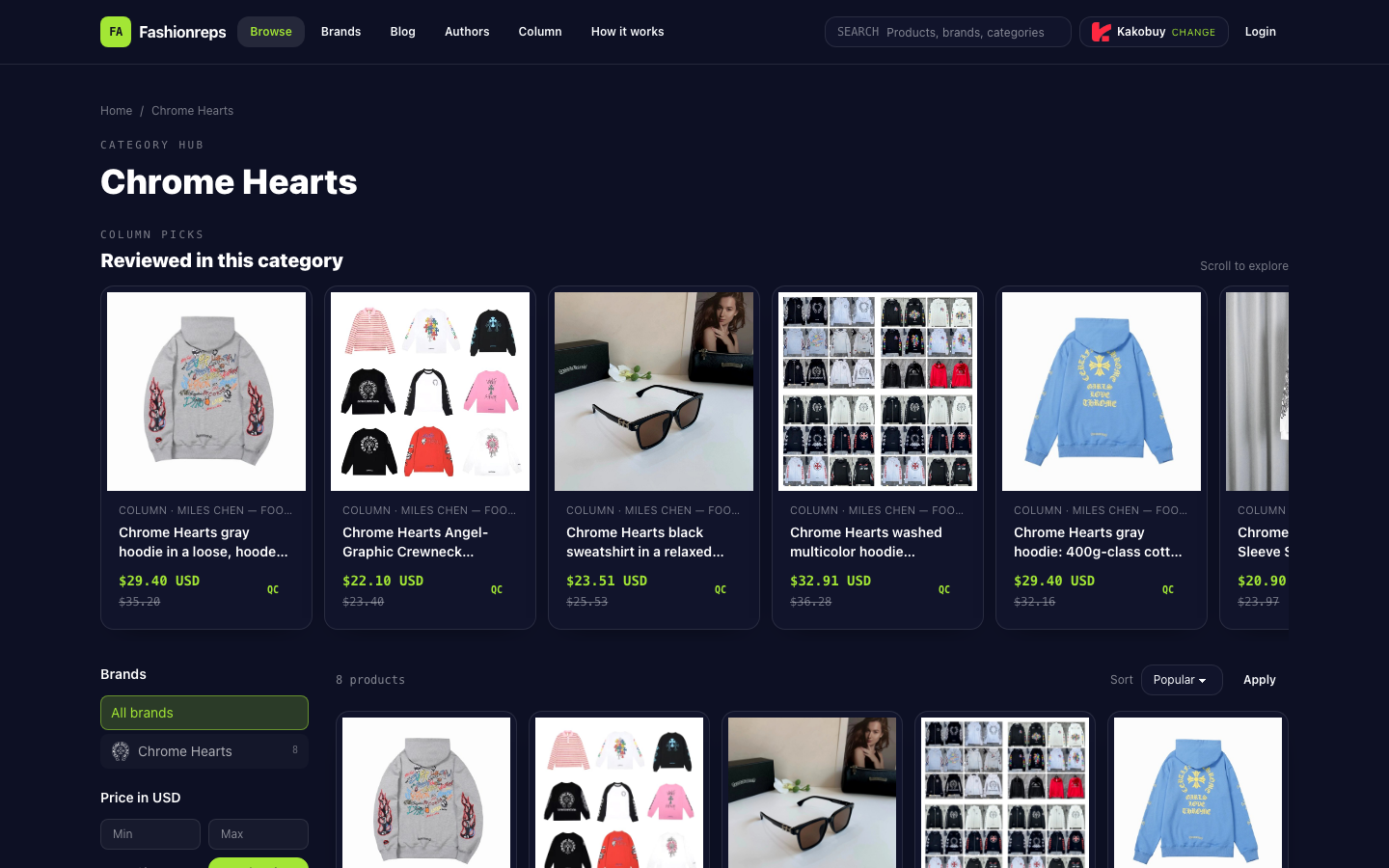
When viewing Chrome Hearts products on Fashionreps, the page shows product information, reference prices, and QC entry, but the provided materials do not include verifiable Chrome Hearts-exclusive coupon codes, discount amounts, or checkout discount promises. Therefore, before payment, do not factor a certain discount amount into your budget; instead, rely on the discount terms and the actual deduction shown on the final checkout page.

First Confirm Where the Discount Comes From
After opening the Chrome Hearts product page, first record the actual source of the discount. Discounts may appear on the product page, in cart prompts, on the checkout page, or on the shopping agent's promotion page, but different entry points may not apply to the same order. If the page only shows product reference prices or historical reference prices, do not interpret them as the final price after applying the coupon.
The current page displays multiple Chrome Hearts products and their reference prices, for example, some hoodies have reference prices of $29.40, $22.10, or $23.51; these numbers are product reference information listed on the page and do not directly prove the existence of an available coupon, nor do they represent the inclusion of agent service fees, international shipping, or other order fees.
Create a Discount Verification Record
Before entering a coupon code or clicking to claim, it is recommended to save the following information item by item:
- Discount entry: product page, cart, checkout page, or agent platform promotion page.
- Coupon code or discount name: record capitalization, spaces, and usage conditions completely.
- Validity period: confirm the expiration time and applicable time zone.
- Minimum spend: confirm whether it is calculated based on product amount, or after deducting other discounts.
- Applicable scope: confirm whether it applies to Chrome Hearts products, and whether it is limited to specific categories, stores, or products.
- Variant restrictions: check whether certain colors, sizes, styles, or specific links are excluded.
- Exclusions: pay attention to whether sale items, already discounted items, shipping, service fees, and other fees do not participate in the discount.
- Stacking rules: confirm whether it can be used with store discounts, platform offers, or other coupons.
- Currency and amount: confirm what currency the discount amount is in, and whether it is shown as a fixed amount or a percentage discount.
- Query time: record the date and time you viewed the discount to avoid being unable to review after activity changes.
If any of these items is not clearly stated, do not consider that discount as confirmed.
Check Step by Step Across Four Pages
1. Product Page
Confirm the product name, style, size, color, and currently displayed price. The Chrome Hearts category page lists multiple different styles, and the page information may also include fabric weight, fit, and QC labels. Do not assume that all products share the same coupon or threshold just because they are in the Chrome Hearts category.
Also save a screenshot of the product page, making sure the screenshot shows the product name, price, selected variant, and any discount notice. If the product page does not show a coupon code or discount conditions, only record it as "no verifiable discount found" and do not calculate a discount on your own.
2. Discount Details Page or Promotion Entry
Open the discount details and check whether the applicable conditions cover the current product. Focus on verifying minimum spend, validity period, excluded products, and whether a specific agent account is required. If the discount description only says "available on select items" or "subject to checkout page," it cannot be considered final confirmation yet.
3. Shopping Cart
After adding the exact style and variant you intend to purchase to the cart, observe whether the system accepts the coupon code or automatically shows the discount. At this point, record the product subtotal, discount amount, and amount after discount, and confirm that the products in the cart have not been replaced with other colors, sizes, or links.
A discount shown as available in the cart does not guarantee the final order deduction. Pay special attention to whether the cart has already calculated service fees, domestic shipping, or other fees, and whether the discount applies to the product amount or the order total.
4. Final Checkout Page
Before payment, check the order details on the final checkout page. At least confirm the following:
- The coupon code or discount name is still in an applied state.
- The product subtotal matches the cart.
- The deduction amount is shown as a clear negative number or discount line.
- It has not become invalid due to minimum spend, product exclusions, or variant changes.
- Account, currency, and payment amount are correct.
- Shipping, service fees, and other charges are not mistakenly treated as the discounted product price.
Only when the final checkout page clearly shows the deduction amount and the total due has been reduced accordingly can you factor the discount into your payment budget. If the coupon code shows "used" but the total has not changed, pause payment and recheck the order details.
What to Do When There Is No Coupon Code
The current materials do not provide a verified Chrome Hearts coupon code or a definite discount, so the safest approach is:
- Treat the reference price currently displayed on the product page as information to be verified, not as the final total.
- Test the discount entry in the cart and on the checkout page separately, and save the conditions and results that appear.
- If the page prompts you to contact customer service, confirm the product link, variant, minimum spend, validity period, and exclusions with the corresponding shopping agent.
- Ask customer service to clearly state the product amount after the discount and whether it affects shipping, service fees, or other order charges.
- Before the final checkout page shows a clear deduction, prepare your budget based on the undiscounted amount.
If the discount conditions cannot be confirmed through the page or customer service, or if different pages show contradictory information, stop using that discount as a reason to purchase and keep screenshots for later review.
Conclusion
Whether a Chrome Hearts product can use a coupon cannot be judged solely based on the category page, reference price, or cart prompt. You should start with the discount source, record the validity period, threshold, applicable scope, exclusions, stacking rules, and currency item by item, then check the product page, discount details, cart, and final checkout page in sequence. When there is currently no verified coupon code or definite discount, only when the checkout page actually shows a deduction is the discount considered confirmed.