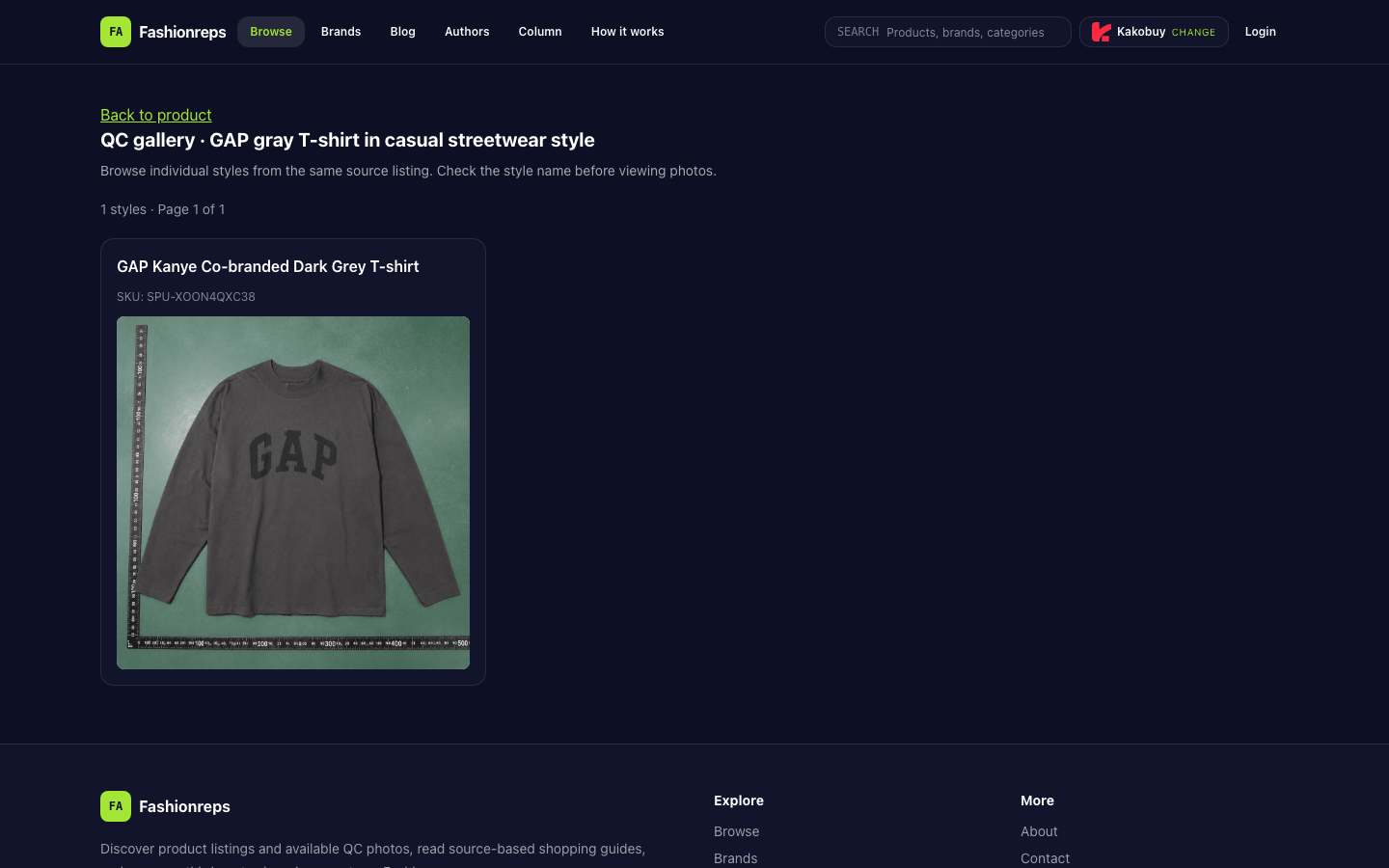
To build a reliable Gap graphic tee candidate list, the key is not to first collect as many items as possible, but to first confirm that each entry's image, print name, size information, and product link actually point to the same item. When verifying the fashion-reps page, what can currently be confirmed is a GAP dark grey T-shirt entry and its QC page; the page also shows that there is 1 viewable style under this source, and lists the SKU: SPU-XOON4QXC38.
To build a reliable Gap graphic tee candidate list, the key is not to first collect as many items as possible, but to first confirm that each entry's image, print name, size information, and product link actually point to the same item. When verifying the fashion-reps page, what can currently be confirmed is a GAP dark grey T-shirt entry and its QC page; the page also shows that there is 1 viewable style under this source, and lists the SKU: SPU-XOON4QXC38.

The image shown is a process diagram for page organization, not a product photo, QC evidence, or first-hand test result.
First confirm that the product card is complete
After opening the product or QC page, first record the name, color description, style name, and SKU that clearly appear on the page. The title of the currently verified page is GAP gray T-shirt in casual streetwear style, and the style name shown on the page is GAP Kanye Co-branded Dark Grey T-shirt. Since the page simultaneously shows the source product title and the specific style name, the candidate list should save these two fields separately to avoid mistaking the page title for the print name later.
It is recommended to first establish the following basic fields:
| Field | Currently recordable information | Role in filtering |
|---|---|---|
| Brand | GAP | Distinguish brand scope |
| Product title | GAP gray T-shirt in casual streetwear style | Preserve the page's original description |
| Style name | GAP Kanye Co-branded Dark Grey T-shirt | Check the specific print or collaboration description |
| Color description | Dark Grey | Check consistency between text and image |
| SKU | SPU-XOON4QXC38 | Prevent confusion between entries with the same name |
| QC page status | Page can be opened and displays QC photos | Mark whether a verifiable entry point exists |
The "currently recordable information" in the table is limited to what is clearly shown on this verification page. When the page does not provide sufficient evidence, one should not fill in size, fabric, fit, price, inventory, shipping, or physical details on their own.
Image and print need to be checked in two steps
The first step is to see whether the image belongs to the current style. The page prompts users to browse individual styles from the same source and asks them to check the style name before viewing photos. When there are multiple styles under the same source, the style name shown on the page should be written into the candidate list first, and then the corresponding image and QC entry should be placed in the same row.
The second step is to see whether the print in the image corresponds to the text description. Do not name a print as a specific collaboration or series just because a pattern appears in the image; only record a specific print name when the page text or corresponding product information clearly supports it. The text that the current page can support is "GAP Kanye Co-branded Dark Grey T-shirt", but this does not mean that the physical identification of print details, print position, or print quality has been completed.
A column called "Print verification notes" can be added to the table, using the following statuses:
- Confirmed by both page text and corresponding image: can enter the candidate area.
- Only product title, no corresponding image: hold off on inclusion.
- Has image, but cannot confirm which style the image belongs to: hold off on inclusion.
- Image clearly inconsistent with style name: remove from candidate area, and keep the reason.
- Only a schematic or non-product image: cannot be used as product evidence.
Size field cannot use blank to replace unknown
Size is the field most easily mis-filled when filtering candidate products. When the page does not display a size chart, selectable sizes, or size range, it should be recorded as "Not displayed", rather than written as a common size range. This way, later filtering can distinguish between "the page confirms this size is not available" and "size information has not been found yet".
It is recommended to split into three fields:
- Size as shown: record exactly what the page displays.
- Size range: fill in only when the page clearly lists multiple sizes.
- Size evidence status: displayed, not displayed, cannot correspond, or pending review.
If the candidate list is used for pre-purchase filtering, the size evidence status should be set as required. Entries with empty size can be kept as pending review records, but should not be marked as direct purchase recommendations.
Link status needs to be recorded separately
Product link, QC entry, and external purchase agent entry are not the same field. The fashion-reps page explains that users can browse the product list and QC images, and continue processing the purchase through a selected shopping agent; orders, payment, and shipping are handled by the agent website. Therefore, the candidate list should at least distinguish between the product page link and the QC page entry, and should not mistake the existence of one link as confirmation of all purchase information.
Link status can use a simple four-level marking:
- Can be opened and page name matches: keep.
- Can be opened but style name does not match: pending review.
- Page can be opened but no corresponding image or SKU: does not enter qualified candidates.
- Link invalid, product delisted, or product cannot be confirmed: not a purchase recommendation.
The page verified this time can be opened and displays QC photos, style name, and SKU; but the evidence provided does not show price, inventory, shipping, or complete size information, so these fields should remain unconfirmed.
Division of labor between website-type spreadsheet and Google Sheets
A website-type product catalog is suitable for initial discovery and review: users can enter the product page from the product list, then view the corresponding QC page and style information. Its value lies in placing the product name, image entry, style name, and QC entry in the same browsing path, making it easy to confirm whether the image still corresponds to the original entry.
Google Sheets is more suitable for structured filtering after candidates have been found. Filter columns can be set for brand, color, print verification status, size evidence status, SKU, product page status, and QC status, and notes can be used to record the reason and date of each review. It should not replace the product page itself, nor should blanks in the table be automatically interpreted as the product lacking that attribute.
A safer workflow is: first confirm the product and QC page in the website catalog, then copy the confirmed fields to Google Sheets, and finally use filter columns to exclude entries where image, print, size, or link cannot correspond. This way, the website is responsible for providing product evidence, and the spreadsheet is responsible for managing the judgment results.
A reusable filtering process
- Search or open the Gap graphic tee candidate page, confirm the page title and specific style name.
- Check whether the page displays the corresponding image or QC entry, and confirm the image belongs to the current style.
- Record brand, product title, style name, color description, and SKU.
- Fill in print verification notes separately, do not fill in pattern details on your own based on blurry images.
- Check size information; when not displayed, record "Not displayed", do not speculate a size range.
- Save product page and QC page status separately, confirm the link still leads back to the same product.
- Mark entries that have not completed verification as pending review, rather than directly listing them as purchase candidates.
- Filter by evidence status in Google Sheets, keeping only entries where image, print, size, and link can correspond to each other.
Conclusion boundary for the current entry
As of this page verification, the GAP dark grey T-shirt entry has a recordable product title, specific style name, SKU, and QC page entry, suitable for placing in the "pending further verification" or "basic information confirmed" area of the candidate list. The page evidence is insufficient to confirm complete size, fabric, fit, price, inventory, shipping, or actual print quality, so they should not be written as verified purchase conditions.
The qualification standard for the candidate list should remain simple: only when the image can correspond to a specific style, the print description has page basis, the size status is clearly recorded, and the product page and QC entry still correspond to each other, should an entry be suitable for entering the final filtering results.