First, Define the Specific Manifestations of Stussy Product Info Inconsistencies When a Stussy product link opens but the title, images, colors, sizes, or material descriptions contradict each other, don't rush to place an order, repeatedly refresh, or regenerate the order. This article only addresses one specific situation: the fashionreps product page is accessible, but the product
First, Define the Specific Manifestations of Stussy Product Info Inconsistencies
When a Stussy product link opens but the title, images, colors, sizes, or material descriptions contradict each other, don't rush to place an order, repeatedly refresh, or regenerate the order. This article only addresses one specific situation: the fashionreps product page is accessible, but the product specifications on the page are insufficient to support a reliable selection.
After reading, you should be able to accomplish three things: save enough page evidence, determine which field the inconsistency lies in, and decide whether to continue verification, contact support, or stop operating. This article does not apply to after-sales disputes after payment, discrepancies between warehouse physical items and the page, or situations requiring authentication of product authenticity.
What Visible Evidence Should Be Saved First on the Fashionreps Product Page
First record the information directly visible when the page opens, not just the browser address. It is recommended to screenshot the following:
- The complete product title and brand or category information at the top of the page.
- The product main image, color thumbnails, and size options.
- The reference price, original price, or discount information displayed on the page, as well as the page date.
- The material, weight, fit, applicable size range, and other specifications in the product description.
- The purchase entry on the page, and the currently selected shopping agent platform.
- The screenshot time, currency used, and the category the page is in.
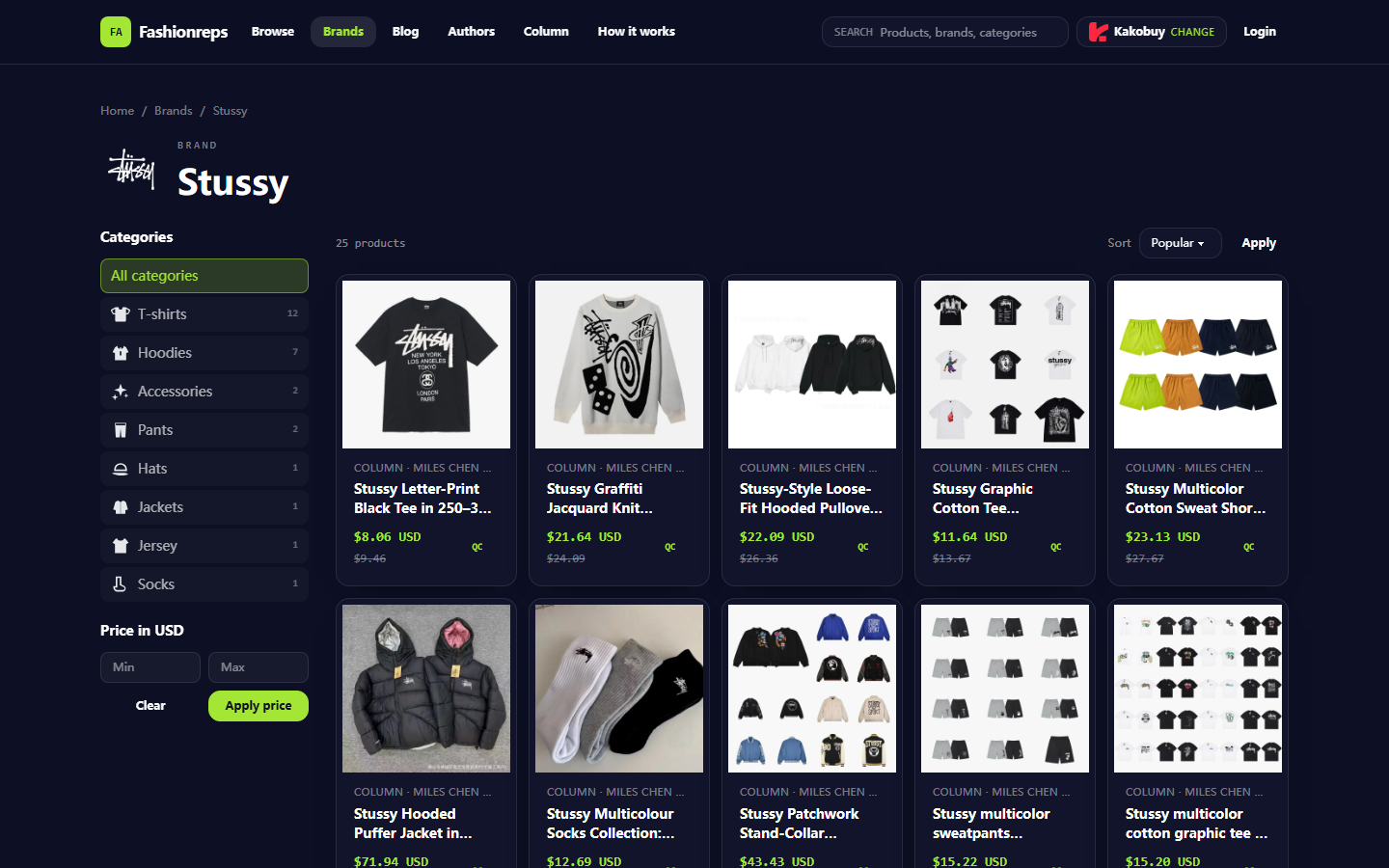
The Stussy brand catalog screenshot on fashionreps shows that the brand page includes category filters, price filters, product cards, and shopping agent selection entry; the screenshot also shows multiple products with similar names but different materials, colors, sizes, and fit descriptions. This catalog evidence can only prove that the page displayed these visible fields at the time of recording, and cannot prove that inventory, final selling price, or actual product matches the description. 🧾

Figure: Visible product categories, reference prices, and specification summaries in the Stussy brand catalog on fashionreps.
How to Cross-check Title, Images, Colors, and Sizes Item by Item
Don't treat the title as complete specifications. Verify in a fixed order to avoid jumping to the purchase button after seeing familiar brand words.
| Verification item | Page evidence to check | Action when a discrepancy is found |
|---|---|---|
| Product title | Whether brand, category, print, fit, and color can correspond to the detail page | Save the title and first image of the detail page, hold off on confirming the order |
| Product images | Whether the main image shows the same style, print placement, and garment structure | Compare visible features in the image such as sleeve type, collar, zipper, or pockets |
| Color | Whether color name, swatch, main image, and variant options are consistent | Do not judge the actual color solely by the swatch; record the page text and screenshot |
| Size | Whether available sizes, size range, and size chart are consistent | If there is no measured data or size chart, mark as insufficient specifications |
| Material and weight | Whether the fabric composition, weight, and fit information in the description are clear | If the source is missing or contradictory, do not treat the description as confirmed fact |
For example, the title says "250–300 gsm", but the detail page does not specify the weight corresponding to a specific style; or the title shows S-XXL, but the variant area only shows some sizes. Such situations are not simple typographical differences, because they will directly affect size selection, weight estimation, and subsequent return/exchange judgment. 🔍
During verification, also distinguish between "the page does not show" and "the product does not have that specification". The former only indicates insufficient evidence, and cannot infer the latter.
Troubleshooting Order When the Link Opens but Specifications Are Missing
First step: Reopen the same link and confirm whether the page displays stably. Record whether the page title, main image, and specification area change after refresh. If different content appears each time you open it, stop repeated refreshing and save screenshots at multiple time points.
Second step: Confirm that you are on the product detail page, not the brand page, category page, or search results page. The brand catalog itself can display many product summaries, but cannot replace the complete specifications of a single product. If you are still on the list page after clicking, check whether the purchase entry or product card actually points to the detail page.
Third step: Verify the product identity on the page. At least match the product name, main image, color, and category. For example, among T-shirts, the black print, white print, and different weight versions cannot be considered the same product just because the titles all contain Stussy.
Fourth step: Check if the specification fields are only partially loaded. See if there is a blank size chart, unexpanded color options, missing material description, or unselectable variants. Do not fill gaps in the current product with specifications from similar products.
Fifth step: Verify product information before and after the shopping agent redirect. The fashionreps page shows that the purchase button will go to the user-selected shopping agent platform. After redirect, check whether the agent page still retains the original product title, images, variants, and quantity. If the agent page shows a different product or unrecognizable specifications, save screenshots of both sides and do not repeatedly click purchase.
Sixth step: Record conflicting fields and stop expanding operations. It is recommended to use a five-column simple record: "page title, detail description, images, selectable variants, agent page display". As long as two key fields cannot correspond, enter manual confirmation instead of guessing to complete the order. ⏸️
How to Cross-check Website Spreadsheet with Product Detail Page
If you see both a website Spreadsheet, product card, or organized table, do not assume the Spreadsheet is the latest or higher-priority source. It is more suitable for discovering field differences, and ultimately you should return to the currently accessible product detail page for verification.
You can compare as follows:
- Copy the core identifying words from the product title, removing irrelevant marketing adjectives.
- Compare the style features in the images to confirm it is not another product from the same brand.
- Compare color names and size ranges, marking options that are added, missing, or spelled differently.
- When comparing prices, note the currency, page date, and price type. Reference price is not equal to final payment amount.
- For material, weight, and fit, only record what the page explicitly states, and do not complete with similar products.
- Categorize differences as "text difference", "option difference", "image difference", and "cannot determine", for later assistance.
If the Spreadsheet only says "Stussy T-shirt", while the product detail page shows multiple colors or different size ranges, the short name in the Spreadsheet cannot be used as the sole product identity. At this point, the page evidence that can display specific images, variants, and details should be prioritized, and screenshots of both pages should be kept.
When to Mark an Issue as Pending Manual Confirmation
If any of the following occurs, mark it as pending manual confirmation:
- The product link opens, but the title and main image are clearly not the same style.
- The page lists multiple colors, but there are no corresponding color options.
- The title contains a size range, but the detail page has no size chart or incomplete selectable sizes.
- Material, weight, or fit conflicts appear on different pages.
- The agent platform cannot recognize the product, variant, or quantity.
- Page fields change after refresh, and it is impossible to confirm which version is valid.
- Price is visible, but product identity or purchase specifications are still unclear.
Pending manual confirmation is not synonymous with "out of stock" or "platform malfunction". It only means that the current evidence is insufficient to safely proceed to the next step. Do not write that fashionreps has malfunctioned just because the page cannot be opened, fields are missing, or redirects are abnormal, unless there is continuous, repeatable, and verifiable records to support that conclusion.
Official Support Channels and Screenshot Information to Keep
Give priority to submitting the issue through the official on-site support entry, account help entry, or contact channel visible on the product page. If the issue occurs on the shopping agent page after redirect, you should also contact the support of the agent platform that actually will handle the order, not just submit the order issue to the content catalog.
When submitting, explain:
- The product detail page title and page address are automatically retained records.
- The specific field where the inconsistency is found, e.g., "Title says S-XXL, but variant area only has M and L".
- Screenshot time, currency, and the page you are on.
- The correspondence between product image, color options, size options, and the agent page.
- The single question you want them to confirm, e.g., "Please confirm whether the black variant corresponds to this main image".
Do not publicly disclose order number, full shipping address, phone number, payment card information, or passport information. If personal information, payment information, or complete shipping labels appear in the screenshot, cover them before submitting. 🔒
Final Checklist Before Stopping Repetitive Operations
Before clicking purchase again, switching agents, or regenerating records, complete the following checks:
- Have you confirmed that the current page is a specific product detail page, not a brand catalog or category page?
- Have you saved original screenshots of the title, main image, colors, sizes, and specification fields?
- Have you clearly distinguished between missing page information and the product actually not having that specification?
- Have you verified the product identity between the detail page and the shopping agent page?
- Have you recorded the page date, currency, and reference price without writing them as final costs?
- Have you asked only one specific question that requires official confirmation?
- Have you avoided duplicate orders or records due to refreshing, repeated clicking, or re-importing?
If two or more of the above questions cannot be answered, the safest action is to pause the purchase and wait for manual confirmation. Especially, do not fill in material, weight, size, or color on your own just to make the form complete.
Conclusion: Use Page Evidence as a Stop Line Before Purchase
For Stussy products on fashionreps, a link opening does not mean specifications are confirmed. Effective troubleshooting should start from page evidence, and sequentially check product identity, images, colors, sizes, materials, and shopping agent redirect results.
The benefit of doing so is to reduce duplicate orders and subsequent communication costs caused by wrong links, wrong color selection, or insufficient size information; the cost is the need to save additional screenshots and wait for confirmation, and immediate purchase cannot be guaranteed. It is suitable for users who are comparing multiple similar products, finding conflicting page fields, or preparing to hand over products to a shopping agent for ordering.
If you only need to browse the brand catalog and are not ready to purchase, or you have already obtained independent size and product confirmation from the seller, you do not need to repeat all steps for the sake of form. But as long as the product identity, specifications, and agent page cannot correspond simultaneously, you should stop repetitive operations and turn the issue into a verifiable manual confirmation item.