Before placing an order, the focus of checking watch QC pictures is not to judge whether they look authentic, but to confirm whether the images correspond to the model, size, color, and strap variant you selected, and to check whether key parts that affect the receipt decision have been photographed. This article uses the Longines Spirit-Style 40mm Pilot Watch with Gray Dial and Steel Bracelet in the current page record as an example to explain how to c
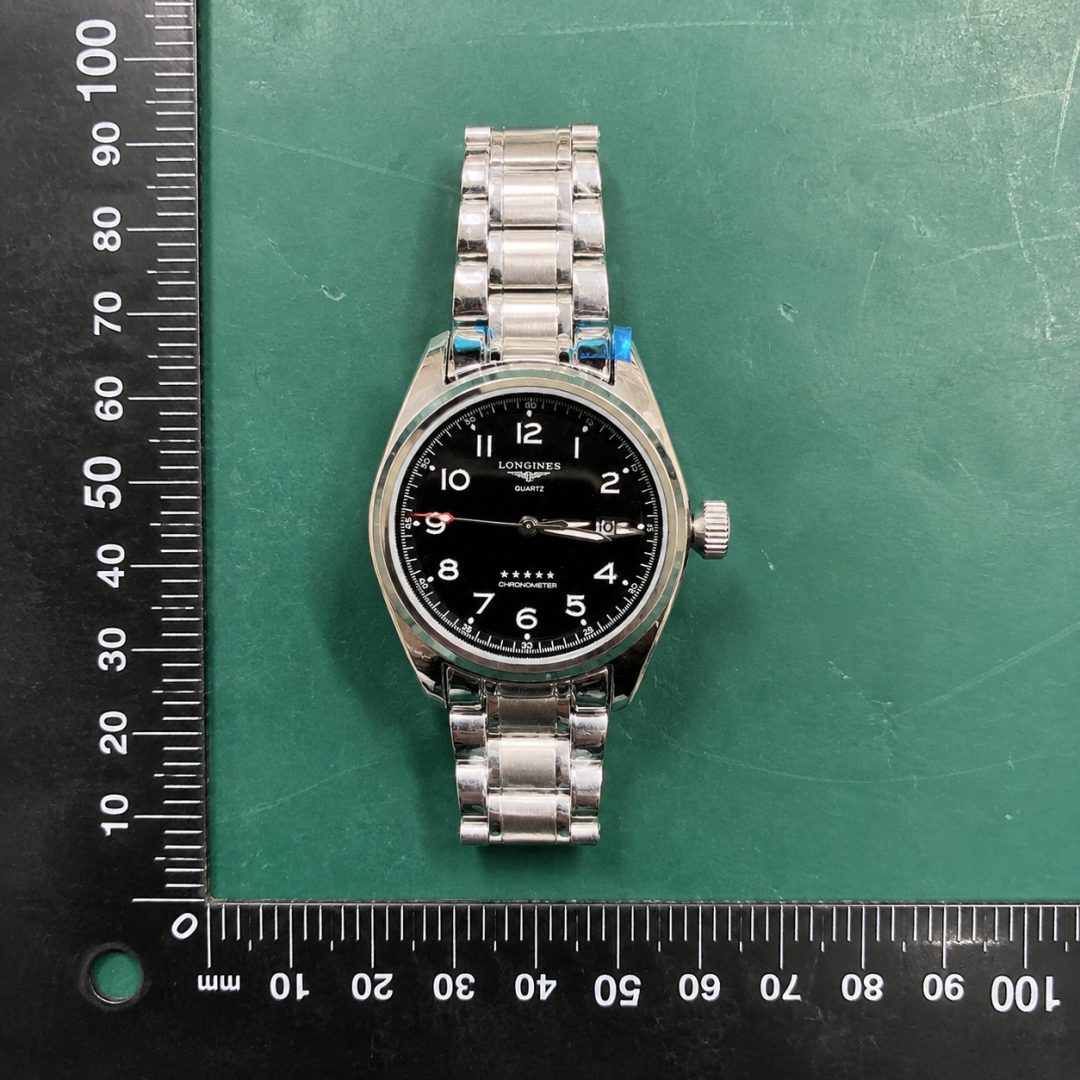
Before placing an order, the focus of checking watch QC pictures is not to judge whether they look authentic, but to confirm whether the images correspond to the model, size, color, and strap variant you selected, and to check whether key parts that affect the receipt decision have been photographed. This article uses the Longines Spirit-Style 40mm Pilot Watch with Gray Dial and Steel Bracelet in the current page record as an example to explain how to check by area. Since the current product record contains inconsistent product name fragments, the final correspondence cannot be confirmed solely from the page summary; in such cases, shipping confirmation should be paused first.

First confirm which product the QC pictures correspond to
First, record the following information on the same product detail page: product name, size field, dial color, strap option, and order or product identification information. Then enter the View QC Photos entry from that detail page and check whether the product in the gallery matches the current page. Do not look for pictures from the homepage, brand page, category page, or other product pages, and do not guess the product identity based on image file names.
The page summary of this verifiable record describes the product as Longines Spirit-Style 40mm Pilot Watch with Gray Dial and Steel Bracelet, including gray dial, 40mm, and steel bracelet descriptions. But a fragment from the same source data also shows Patek Philippe Watch with Black Dial Bracelet Watch Detail and different SKU information. This conflict is insufficient evidence of product identity and should not be overridden by editorial judgment. Before ordering, reopen the product detail page and confirm that the name, size, color, bracelet, and QC gallery all point to the same product.
Dial: Look at layout first, then details
After opening the original QC image, first confirm whether the overall dial layout matches the product detail page, including the base color, marker arrangement, number of digits or markers, date window position, and the area where brand text is located. Do not just zoom in on the center logo; if the dial color or layout differs from the product page description, record the difference and ask customer service to confirm whether it is the same variant.
Then observe whether the hands are intact, obviously crooked, or scratched, and whether there are visible misalignments, missing elements, or contamination on the edges of markers and text. Photo angle, reflections, and compression may affect judgment, so only record "what is visible in the picture" and do not infer movement performance, timekeeping accuracy, or authenticity from it.
Crown and lugs: Request additional side evidence
The crown needs to be viewed in a separate side or angled photo. Check the crown position, shape, connection to the case, and whether there are obvious dents, scratches, or assembly gaps around the crown. If all photos are taken from the front only, the crown condition cannot be confirmed, and "close-up side view of the crown" should be listed as a supplementary photo item.
The lugs are important parts connecting the case and bracelet. You should confirm whether the lugs on both left and right sides are intact, whether the bracelet is connected on both sides simultaneously, and whether the connection points show obvious misalignment, looseness, damage, or asymmetry. Close-up detail shots are better than distant shots for judging the connection points, but the close-ups must also be traceable to the same product QC gallery.
Bracelet connection: Don't treat distant shots as evidence
When the product page describes a steel bracelet, you should confirm in the QC pictures the bracelet material appearance, link connections, and the attachment to the lugs separately. Focus on recording the following:
- Whether the bracelet is the style selected on the page, not another color or material;
- Whether both left and right connection points are photographed;
- Whether there are obvious dents, scratches, notches, or deformations on the links, clasp, or edges;
- Whether the shooting angle obscures the lugs, spring bars, or clasp area.
If there is only a frontal distant shot and no close-up of the bracelet connection, the connection status cannot be confirmed. You can request customer service to take clear photos of the left and right lugs, first bracelet link, clasp, and case back, and specify that these need to be in the same frame as the current order item or clearly associated.
Case back, size markings, and evidence boundaries
Case back photos can help confirm whether the complete product has been photographed, but you cannot judge authenticity or movement quality solely from the case back text. The size field should also be based on the text record on the product detail page, and you cannot estimate size from photo proportions. If the page says 40mm and the QC pictures have no size markings to verify, this only means the page has that field, not that the actual size has been proven by the QC pictures.
It is recommended to divide the inspection results into three categories: product page facts, image-visible evidence, and editorial judgment. Product page facts include name, size field, color, and bracelet option; image-visible evidence only records the parts actually photographed and visible flaws; editorial judgment explains whether the evidence is sufficient to support a shipping decision. Do not mix the three.
What to do when inconsistencies are found
If the product name, color, size, or bracelet option does not match the QC pictures, first save the page record and corresponding pictures, then contact the platform or customer service to confirm. If photos of the crown, lugs, or bracelet connection are missing, clearly state the supplementary photo request. If customer service cannot confirm which product the pictures correspond to, or if the supplemented photos still do not cover key parts, you can delay shipping and first check the platform's return, after-sales, and warehouse handling conditions.
The current record has inconsistent product name fragments, so it is not appropriate to treat this set of evidence as a confirmed QC conclusion for a longines watch model, nor should you promise authenticity, quality level, or movement performance based on it. The safest judgment standard is: the variant information on the same product detail page corresponds to the same QC gallery, and the dial, crown, lugs, bracelet connection, and case back all have sufficiently clear photos; as long as any one item cannot be confirmed, first supplement the evidence, then decide whether to ship.