First, Clarify What This Organization Task Needs to Accomplish If you're getting ready to browse New Balance shoes on the fashion-reps site, the real issue isn't "which pair looks best"—it's whether you can organize the sizes, colors, product links, images, and QC entry points for the same shoe into a reviewable record. This guide is for people who need to compare multiple variants, save evidence, and collaborate with others before placing an orde
First, Clarify What This Organization Task Needs to Accomplish
If you're getting ready to browse New Balance shoes on the fashion-reps site, the real issue isn't "which pair looks best"—it's whether you can organize the sizes, colors, product links, images, and QC entry points for the same shoe into a reviewable record. This guide is for people who need to compare multiple variants, save evidence, and collaborate with others before placing an order.
After reading, you should be able to do three things: confirm whether the site's product cards provide enough size and color information; structure the visible evidence into Google Sheets; and spot issues like broken links, variant inconsistencies, or insufficient QC information before paying. It doesn't apply to scenarios where you already have a complete order number and need to check actual warehouse inspection results, because product catalog pages are not the same as order QC pages.
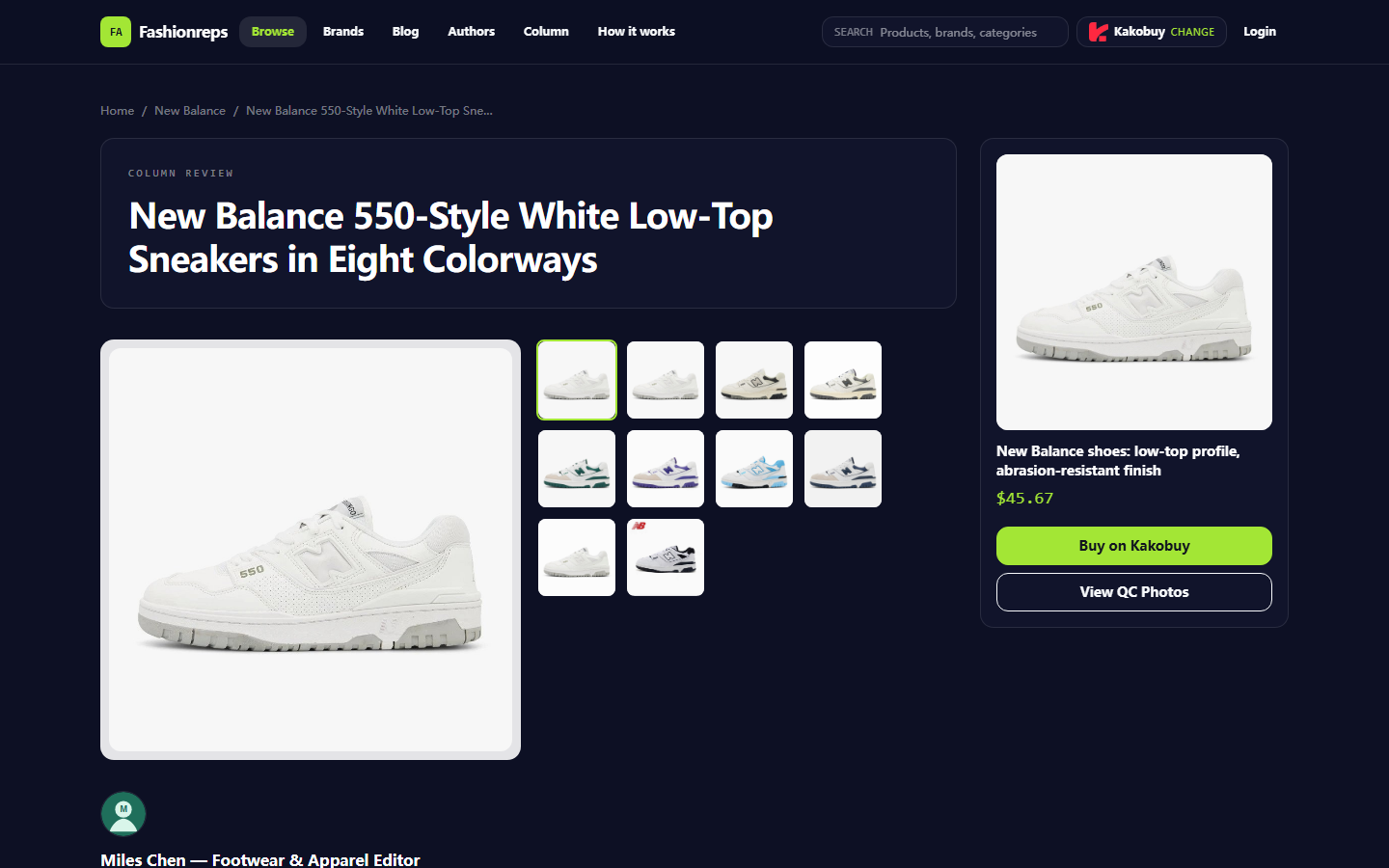
The specified image shows a New Balance 550-style low-top shoe product page, with visible information based on the organization record dated October 15, 2026. 🧾
New Balance 550-style white low-top shoe and eight color options product page, used for checking sizes, colors, and QC entry points
First Check the Product Card on the Site-Style Spreadsheet
The site catalog is good for discovering products and opening details. After entering the New Balance product page, first record what the page explicitly shows—don't treat image observations or community claims as product facts.
The current sample page shows: this model is a low-top, lace-up shoe with a rubber outsole, the size range is 36–44, and the page lists eight color options, including white-black, white-grey, white-green, white-purple, University Blue, navy, all-white, and black. The page also shows a reference price of $45.67, but service fees, international shipping, and other costs need to be reconfirmed on your chosen shopping agent's website.
The information on the page can be divided into three layers:
- Product card facts: name, size, color, shoe type, outsole description, reference price, and product page status.
- Editorial organization within the page: size recommendations, wearing restrictions, material notes, and risk warnings.
- External or community clues: experiential information like heel slippage, stiffness during break-in.
Don't interpret "the page has eight color options" as meaning all eight colors are currently in stock, and don't treat the reference price as the final amount to pay. Inventory, price, link status, and fees are all time-sensitive facts, so note the verification date when saving them.
Build Your Google Sheets with a One-Row Rule
Google Sheets is better for putting multiple product pages into one table to filter, add notes, and collaborate. It's recommended that one row represents one specific shoe model or one clear variant; if colors correspond to different links, images, or size information, don't cram all colors into one vague cell.
| Field | How to Fill In | Review Focus |
|---|---|---|
| Shoe Name | Record as shown on the product page | Don't add model numbers not displayed |
| Color | Use the color names listed on the page | Check if color matches the main image |
| Size Range | Record the starting and ending sizes shown | Don't treat "recommended size" as available stock |
| Product Page Status | Accessible, redirect, 404, or blank page | Broken links must not go into the pending order list |
| Reference Price & Currency | Record page price and USD | Note service fees and shipping as to be confirmed separately |
| QC Entry | Record whether the page can open QC Photos | Distinguish reference images from order actual photos |
| Image Evidence | Save publicly usable page images or internal records | Don't block product details that affect judgment |
| Verification Date | Use YYYY-MM-DD format | Update when price, stock, or link changes |
| Judgment & Next Step | Write down items to confirm | Don't use unproven words like "authentic" or "guaranteed" |
The value of the table isn't in having more fields—it's in each column helping the next action. For example, "Color" is for filtering same-color models, "QC Entry" is for judging whether there's a path for further verification, and "Verification Date" is for identifying outdated information.
Division of Labor Between Site Browsing and Google Sheets
Site pages are good for browsing layer by layer by brand, product card, and detail page. You can first open the New Balance category, then enter a specific shoe to view images, sizes, colors, prices, and the View QC Photos entry. The Buy button on the page is also linked to your selected shopping agent, so confirm the current agent is correct before ordering.
Google Sheets is good for horizontal comparison after browsing. You can filter shoes with a size range of 36–44, view records that still have QC entry points, or find old pages that need to be reopened by verification date. When collaborating with multiple people, it's suggested to separate factual records, items to confirm, and personal judgments, to avoid mistaking editorial opinions for original text on product pages.
The two can't replace each other: the site is the evidence entry point, and the table is the tool for organizing and reviewing. After copying a site page to the table, you should still go back to the original page to confirm whether links, images, and variants have changed. 🔍
How to Compare Sizes, Colors, Images, and QC Paths Step by Step
Step 1: Open the product detail page and record the page title, product type, size range, number of colors, price, and update time. The current sample page shows a New Balance 550-style low-top shoe, sizes 36–44, eight color options listed, and an update information date of September 26, 2026.
Step 2: Check whether colors are just text options, or whether each color has corresponding images or independent links. If the table records white-black, white-grey, and all-white colors, but there's only one indistinguishable image, mark it in the "Items to Confirm" section rather than assuming they use exactly the same materials or details.
Step 3: Open the QC Photos entry separately. Reference images only help you understand the style the page refers to, and don't equal your order's warehouse actual photos. Only after an actual order is generated can you check the upper, sole, size label, and obvious flaws based on the inspection pictures provided by the shopping agent.
Step 4: Save page-visible facts, public discussion clues, and editorial judgments in separate columns. The sample page's editorial organization suggests the model fits true to size overall, with a snug instep area and hard sole feel; these are just pre-purchase risk warnings and can't replace personal foot shape judgment or actual QC.
Step 5: Go back to Google Sheets for filtering. Prioritize records where the link is still accessible, the size range meets your needs, color information is clear, and the QC path is open. Set a "pause" status for products missing key fields rather than forcing completion just to finish the list.
Which Information Must Be Distinguished by Evidence Level
The product name, size, color, shoe type, rubber outsole, and reference price directly shown on the page are visible evidence at the catalog level. The page's editorial content mentions choosing true to size, a snug instep, and a hard midsole not suitable for long standing; these are publicly organized usage tips.
Community clues require more caution. The sample page organizes some wear feedback, including possible heel slippage, more stability after tying laces at the ankle, and initial stiffness for a few days. They can help you form questions to check, but can't be written as the common experience of all buyers, nor used to promise comfort or durability.
For materials, the page only explicitly shows the upper, lining, and technology category as "other", and confirms rubber outsole. Therefore, don't arbitrarily fill in specific leather, mesh, or synthetic materials in the table. Missing information itself is a result that needs to be retained. 📌
Stop Conditions When Information Is Missing or Inconsistent
If any of the following occurs, pause organizing or pause ordering:
- The product page is inaccessible, redirects to unrelated pages, shows 404, or lacks a clear product name.
- The number of colors in the table doesn't match the actual options on the page, and you can't determine which colors are still valid.
- The size range only appears in images, with no reviewable information in text areas.
- The reference price exists, but the selected shopping agent's page can't confirm service fees and international shipping.
- The QC entry doesn't open, or the page only provides generic reference images that are mistaken for order actual photos.
- Product images, variant names, and links point to different styles.
- You need actual warehouse inspection results, but currently only have public catalog evidence.
When encountering stop conditions, keep a problem record, page status, and verification date in Google Sheets, and wait to revisit or obtain more direct evidence. Don't use search result summaries, old screenshots, or similar shoes to replace the current product page.
Pre-Order Review Checklist
- The product name matches the target New Balance shoe.
- The selected color exactly corresponds between the page options and the table.
- The target size is within the range shown on the page, but the range is not mistaken for current stock.
- The product link can be opened and doesn't redirect to a blank page or another variant.
- Reference price, currency, shopping agent, service fees, and international shipping are recorded separately.
- Catalog images, public discussion clues, and order QC images are distinguished.
- The page update time and the Google Sheets verification date are clearly visible.
- Tips about a snug instep, hard sole, and heel slippage are kept as risk information, not purchase guarantees.
- If you need long-standing comfort, a roomy fit, or explicit material proof, you've reassessed whether it's suitable.
After completing these checks, the site page is responsible for providing current visible evidence, and Google Sheets lets you review by shoe model, color, size, and QC status. Before final ordering, you should still rely on the available options, fees, and subsequent order QC shown on the shopping agent's page.
Article Image
