Image: Fashionreps product and QC browsing page example. If you're filtering Supreme fall/winter hoodies, the real problem isn't "which spreadsheet looks more professional"—it's whether you can link color, size, product page, and QC ent
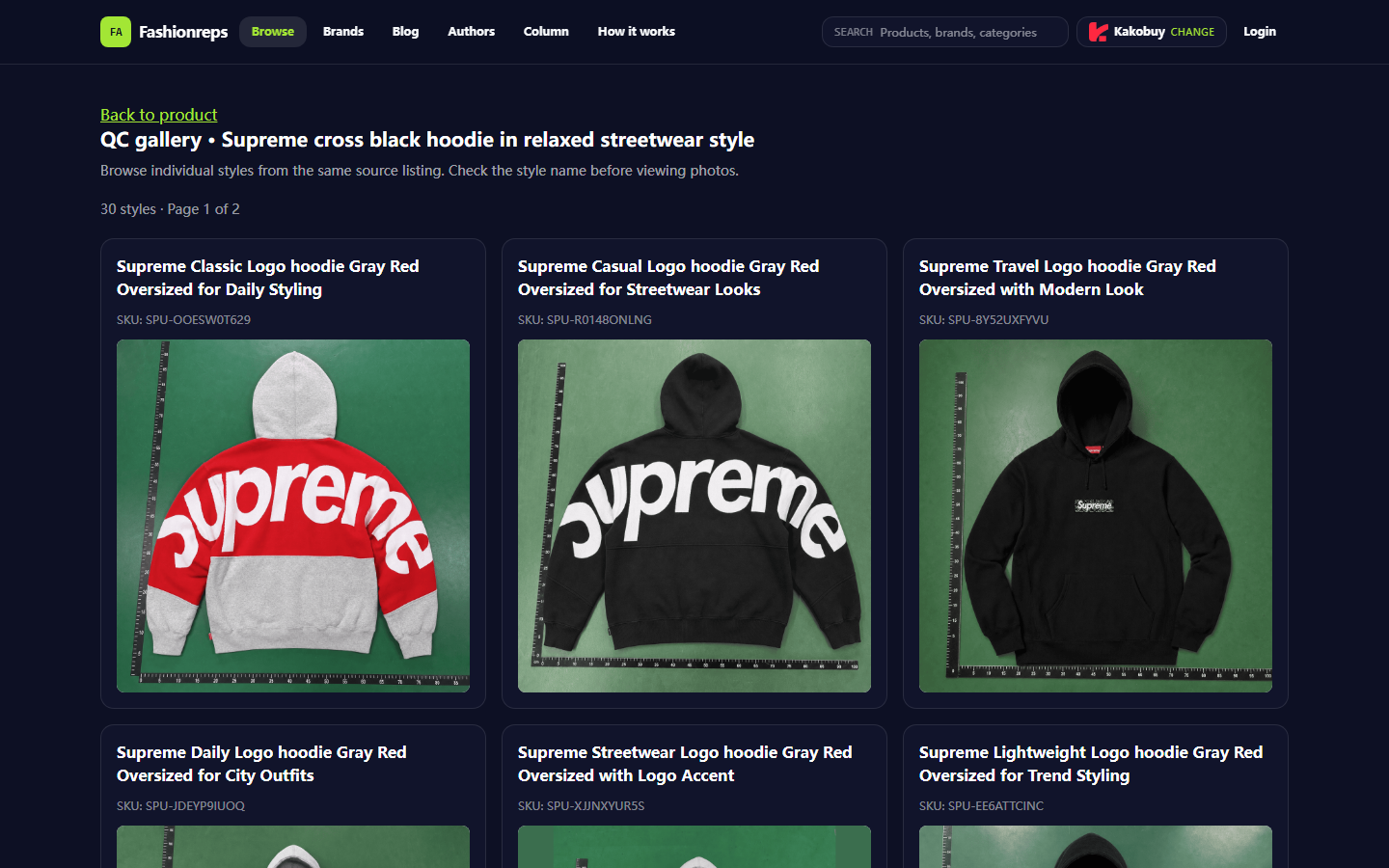

Image: Fashionreps product and QC browsing page example.
If you're filtering Supreme fall/winter hoodies, the real problem isn't "which spreadsheet looks more professional"—it's whether you can link color, size, product page, and QC entry to the same candidate. This guide compares the website-based catalog on fashion-reps.net with a Google Sheets organization method to help you record candidates, verify item by item, and pause ordering when information is insufficient. 🧭
This article only discusses the catalog, product cards, product details, and QC browsing entries that are directly visible on the page. Colors, sizes, stock, prices, sellers, materials, and shipping costs may change, and cannot be inferred from titles or images alone. Verification date is October 18, 2026; in practice, always rely on the information shown when you open the page.
Define the Filtering Task and Evidence Boundaries for Supreme Fall/Winter Hoodies
First, limit the task to four fields:
- Color: Record the color name explicitly shown on the page; don't treat shadows or lighting in images as color conclusions.
- Size: Record the sizes explicitly listed on the product page or variant area; don't infer fit from descriptions like "oversized" or "relaxed".
- Product identity: Save the product name, style name, or SKU to avoid mixing up similar cards.
- QC entry: Confirm whether the entry can open the QC page for the corresponding product or style, not just stay on the catalog or tag page.
Fashionreps pages can be used to discover candidates and continue browsing different styles through product cards. The page example shows Supreme-related hoodie styles, color descriptions, relaxed fit text, and SKUs. They can serve as screening clues, but cannot automatically prove that the actual color, size accuracy, material feel, or stock is still valid.
If your goal is to judge fabric thickness, real color difference, fit, or authenticity, and the current catalog evidence is insufficient, stop inferring and look for clearer product information or QC images. Don't write page display images as if you've touched, worn, or received the item. 🔍
Find Candidate Hoodies from the fashionreps Website Spreadsheet
The website spreadsheet is more like a browsable product catalog: first discover candidates by brand, category, or search terms, then enter product cards and detail pages. It's suitable for the first round of filtering to answer "which candidates do I have".
Suggested order of operations:
- First confirm that the current page belongs to Fashionreps' product catalog or product details, not a generic tag page, empty results page, or a page that can't be opened further.
- Use Supreme, hoodie, winter, or the category terms actually provided on the page to find candidates. Don't force unrelated hoodies into the fall/winter category just to expand results.
- Open candidate cards and record the full product name, visible color text, size fields, and SKU.
- Check whether the page provides an entry to continue viewing product details or QC.
- When you find multiple styles with similar names, save each SKU individually; don't rely only on thumbnails to assume they are the same product.
The catalog's advantage is contextual continuity: you can go from a brand or product card to details, then view other styles from the same source. Its limitation is also obvious: after the page updates, card text, link status, and visible variants may change, and historical records cannot replace current page verification.
Set Up Color, Size, and QC Entry Columns in Google Sheets
Google Sheets is better for converting discovered candidates into a reviewable worksheet. It does not automatically prove product information is true, nor does adding filter columns fill in missing color, size, or QC evidence.
Use a structure with one candidate per row:
| Field | Recording method | What cannot be directly inferred |
|---|---|---|
| Product name | Record as shown on the page | Don't merge similar names as the same item |
| SKU | Save the SKU exactly as displayed | Don't guess color or size from SKU |
| Color | Record explicit page text | Don't infer actual color from dominant image color |
| Size | Record sizes listed on the page | Don't derive size chart from loose fit descriptions |
| Product page status | Openable, redirect, empty page, or inaccessible | Don't treat old links as currently valid |
| QC entry status | Corresponding entry opened, entry missing, or pending review | Don't treat ordinary images as QC evidence |
| Last verification time | Write the date of this check | Don't treat the date as a stock guarantee |
After entering data, use filters to show only rows where "color is clear, size is clear, product page is accessible, QC entry is opened". For missing fields, use "pending verification" rather than leaving blank, because blank cells can be mistaken for already checked.
If collaborating with multiple people, separate "original page records" from "personal judgment". Original page records only save seen text, SKU, page status, and verification time; personal judgment goes into a separate notes column, clearly marked as to-be-confirmed. This reduces repeated page openings and prevents subjective opinions from being written as platform facts. 📋
Compare Verification Order Between Website Product Cards and Spreadsheet Rows
Website cards are for discovery, Google Sheets for organization. When they differ, prioritize the currently open product page as evidence, then check whether the catalog card has been updated.
Recommended verification order:
- First check product name and SKU. Similar names but different SKUs should be kept as different candidates.
- Then check color field. If the catalog wording differs from the product page, keep the page's original text and note the difference in remarks; don't unilaterally standardize to a custom color name.
- Then check size. Only sizes explicitly listed on the page can be entered as available sizes; if size chart is missing, mark as insufficient information.
- Finally open the QC entry. Whether the entry leads to the corresponding style is more important than whether the word "QC" appears on the page.
- Return to the spreadsheet to update status and verification time, instead of keeping conclusions only in browser tabs.
If the website card still exists but the product page has redirected, shows empty content, or cannot confirm product identity, mark that row as paused rather than continuing to use old information. If the product page opens but there's no corresponding QC entry, record "no corresponding entry found", not "flawless" or "QC completed".
Check Product Page and Confirm Whether QC Entry Actually Exists
The key to verifying QC entry is correspondence, not button name. After opening, check whether the page still points to the target product, target style, or a specific SKU. The page example shows Supreme-related styles and QC browsing area, listing multiple style names and SKUs; such information helps distinguish candidates but still requires row-by-row confirmation.
Review with the following checklist:
- Does the product page title match the product name in your spreadsheet?
- Does the page show a corresponding SKU or clear style name?
- Does the QC page belong to that product or style, not a generic image collection?
- Are the images sufficient to observe the parts you care about, such as logos, stitching, prints, or overall color?
- Is there any load failure, empty content, redirect, or inability to open further?
- Do the sizes and colors shown on the page match your spreadsheet records?
QC images can only support judgments about what is actually visible in the images. They cannot alone prove fabric composition, durability, changes after washing, seller fulfillment ability, or that the final received item will exactly match the images. If key information is missing, keep the candidate but set next step as continue verification, not direct order. ⚠️
Record Correspondence Among Images, Links, and Variants
Each row corresponds to only one clear candidate. If a product page has multiple styles, create a separate row for each style and save style name, SKU, color, size, and QC status separately. Don't batch-copy a set of images to multiple variants unless the page explicitly states those images apply to all variants.
Image records can use five fields: "image purpose, corresponding SKU, verification date, page status, notes". Purpose should only state what the image actually helps judge, such as "view front logo" or "observe color presentation"; if the image is merely decorative, don't treat it as quality evidence.
When saving page info, prioritize keeping the system-generated original page URL and don't manually rewrite links. Even if the platform processes links later, the spreadsheet should remain traceable via product name and SKU. If a page becomes inaccessible, keep the original record and mark the expiration date, avoiding silent deletion that causes other collaborators to search for the same candidate repeatedly.
Missing Information, Page Updates, and Non-Inferable Content
The following situations are not suitable for moving directly to an order list: color only appears in images, size not explicitly listed, product page cannot open, QC entry cannot correspond to style, page info from outdated screenshot, or spreadsheet row lacks verification time.
After page updates, first check whether only names or layout changed, then confirm whether product identity, color, size, and entry remain consistent. Don't assume the current page is still valid just because there's already a row in the old spreadsheet.
Also don't infer unshown conclusions from the following:
- From "fall/winter" infer specific weight or warmth level.
- From "oversized" infer suitability for a certain height and weight.
- From black images infer all batches use the same color code.
- From existence of QC page infer product has passed independent inspection.
- From product card existence infer stock, price, shipping, or after-sales policy unchanged.
Create an Action List for Continue Verification or Pause Ordering
After initial screening, you can categorize candidates into three types:
- Continue verification: product page accessible, name and SKU clear, but color, size, or QC still needs confirmation.
- Pause ordering: page inactive, information contradictory, QC entry cannot correspond, or key fields can only be guessed from images.
- Ready for personal comparison: product identity, color, size, and QC entry all recorded, and verification time clear; this still does not mean stock, price, or final quality is guaranteed.
Recommended final check order: open the current product page, confirm name and SKU; confirm color and size text; open and cross-check QC entry; update Google Sheets status and date; finally decide whether to proceed based on personal budget, size needs, destination country import restrictions, and the agent's current page information. Do not publicly share order numbers, full shipping labels, payment info, or other personal data in exchange for so-called QC proof.
The division of labor is clear: fashion-reps website catalog is good for discovery and browsing product relationships, while Google Sheets is good for saving fields, filtering status, and collaborative review. What you save is time from repeated searching and re-checking; the added risks are that the spreadsheet may lag, fields may be mis-entered, and the organizing tool does not automatically increase the credibility of product or QC evidence. Suitable for those who need to compare multiple Supreme hoodie candidates and are willing to verify page by page; not suitable for those who treat the spreadsheet as a substitute for stock guarantee, size advice, or completed quality inspection.